Song list
Viewers just type the song name; it lands on your list with its title. Open it on YouTube in one click.
ChatArcadeGames shows your viewers' requests, plays songs in one click, refunds what you skip and lets you set up every reward. It also presses keys in your game for key-press rewards.
Free · Windows 10 and 11 · single file, no installer
Viewers just type the song name; it lands on your list with its title. Open it on YouTube in one click.
Every request waits by category. Mark it done, or refund it and the points go straight back to the viewer.
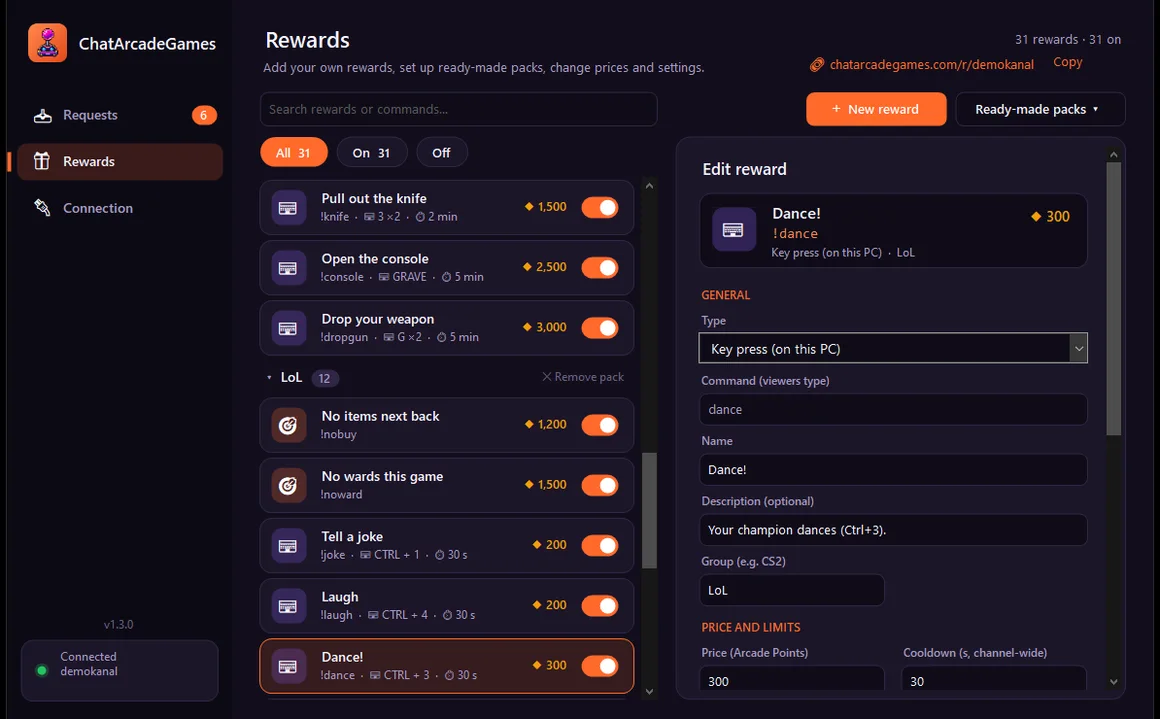
Add your own rewards or a ready-made pack (CS2, LoL, Valorant, Minecraft), set prices, switch them on and off.
Viewers make you drop your gun in CS2 or dance in LoL: the app presses the key on your PC. Pause it any time.
You connect by confirming in your browser. No key or address is ever shown, so the app can be on screen.
Switch the app's language any time; ready-made packs come with commands in that language.
It's a single file, nothing to install. Keep it wherever you like.
Your browser opens; confirm with the account you stream with.
Pick a pack or add your own. Your viewers see them on your rewards page and type the command in chat.
If Windows says “Windows protected your PC”: click More info → Run anyway. The app isn't on the Microsoft Store yet, so Windows doesn't recognise it.
Some games' anti-cheat (for example Riot Vanguard) may block simulated key presses. Requests, songs and rewards work everywhere.